
With the recent release of Android Lollipop SDK, new Material Design became widely available for users and developers. Google re-designed Android layout...

With the recent release of Android Lollipop SDK, new Material Design (opens in a new tab) became widely available for users and developers. Google re-designed Android layouts with a new “visual language”, that provides a consistent, elegant, and very plausible user experience. It’s achieved through ripple touch feedback, cards, view transition animations, and view's elevation API, which uses shadows to determine view's parent in depth space. Developers were also given great design guidelines for typography (Roboto at it’s best), colour Palettes, spacing, and views usability (like button usage, dialogs, or animating visual feedback) connected with good explanation of users expectation to the overall app usage experience.
Material Design in action:
Users and developers of Pre-Lollipop Android devices, were not left out, and can still enjoy few of new Lollipop goodies. With new AppCompat v21 Library, Google placed on developers hands part of backward compatible Lollipop-APIs. In the package we’ll find:
1. Newly introduced Toolbar (opens in a new tab) widget. It’s a generalization of the Action Bar pattern that gives us much more control and flexibility. Toolbar is just another view in view’s hierarchy, so we can add multiple instances to different views and layouts. Below we can see three Toolbars used in main, list, and detail view.
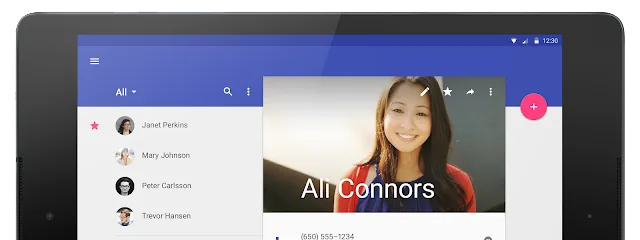
2. RecyclerView (opens in a new tab)– Google describes it as: efficiently displaying large data sets by providing a limited window of data items. It’s like the ListView, but it uses different recycling approach, that allows views to be reused. It greatly improves the performance of the Widget. 3. CardView (opens in a new tab)– A FrameLayout with a rounded corner background and shadow. It also uses elevation property for shadows. 4. Palette (opens in a new tab)– lets us extract a small set of prominent colors from an image to style the UI controls; creating an immersive experience. The extracted palette will include vibrant and muted tones as well as foreground text colors for optimal legibility.
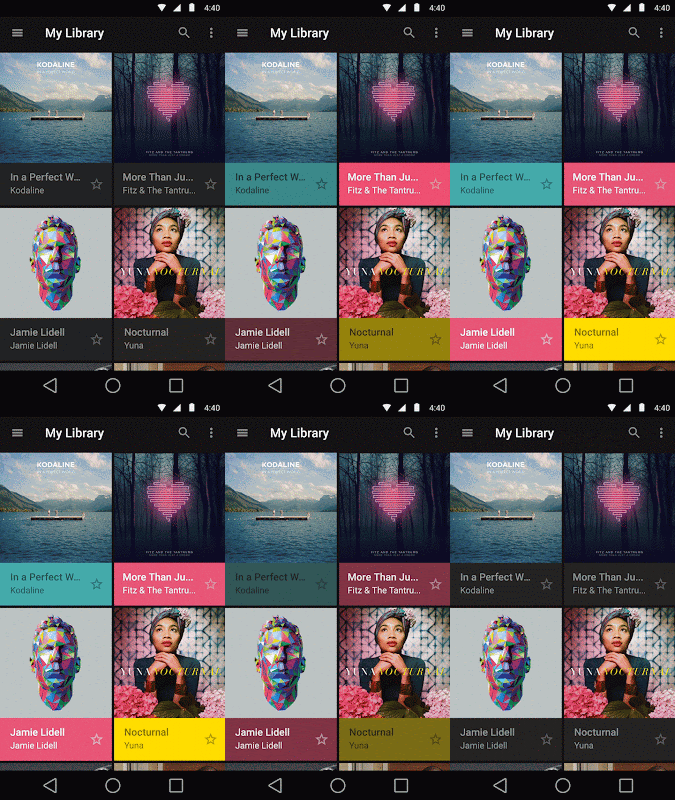
Widget tinting with Palette library
First of them is the support for new color palette theme attributes. Now we can easily customize our theme to fit our color palette with primary and accent colors. It’s as easy as defining the colors in the values/themes.xml file, and AppCompat will propagate them to the framework, giving our app new color scheme.
Second one is the widget tinting, which makes every widget more “fit” into the app colour scheme. It’s done using colours defined in the previous point. At the moment the option is available with these widgets:
Developers were also given the new SearchView Widget, that has updated to the Lollipop style structure, instead of old theme attributes.
Unfortunately, not all Material Design components were already implemented in the support libraries. At the moment there’s no support for the:
1. Ripples – dynamic surface touch reaction. Lollipop has a new drawing engine, that allows these kinds of effects. They’re not supported in older Androids.
2. Also most of the components that comes with new Lollipop, are not yet available. See the list of Material Design components (opens in a new tab).
3. Elevation API methods are present, but using them gives no effects.

We’re hoping that the support libraries will be consequently updated, with the rest of the components, as new Android visual language looks really great, and is truly enjoyable to use.
The eCommerce agency behind 100+ high-stakes projects, ready to build yours.